
How I learned and unlearned from others.
Time to create again and again.
Dearest Friends,
I lost my way, my muse, my mojo and my love of creating mini-babies in 2019 after a bit of tumultuous family drama, following some challenging advice from a Mentor, and trying to please everyone....but my heart.
The one thing that I could pour my heart and hands into started to creep away from me. I'll spare you the family drama details, suffice it to say, I have distanced myself to that situation out of personal preservation and my own health and sanity. But as to taking advice from a Mentor, that was obvious to me early on would not serve me well, sent me into a state of mind that clouded my judgement and stymied my desire to create. By the time I admitted to myself that although the advice was sound in nature for some, it was not at all meaningful for me, my art or my heart.
The Mentor's advice, you ask? Well, it went something like this: "You need to reproduce your work if you ever plan to succeed in the Art Doll world." Meaning: I had to learn how to make copies of my dolls or hire someone else to reproduce my dolls in order to sell more to become successful. So at first, I commissioned casting Artists to reproduce a few of my dolls in silicone and resin. That was expensive and not fun at all. The quality was often wonderful, but other times I was quite unhappy with the quality. So-I struggled, fussed, and learned how to mold, cast, pour my dolls in silicone and resin over about 2 years. I learned how to paint silicone and resin as well. It wasn't what I would call fun. It was frustrating, expensive, trying and often tear-jerking . LOL
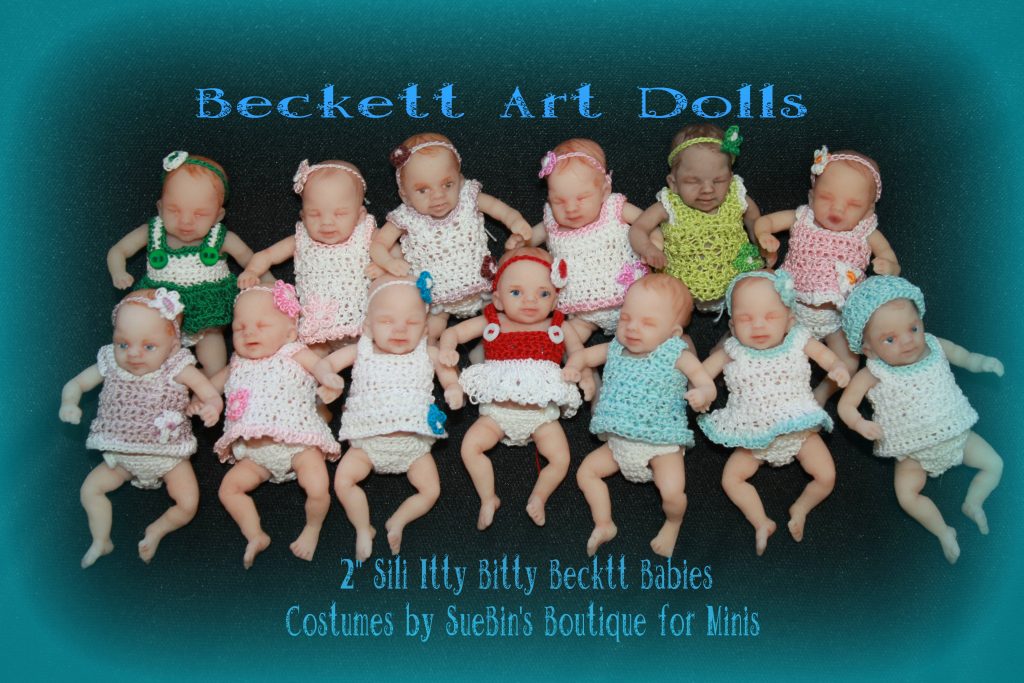
Thankfully, my limited editions were well received and often, Collectors returned for additional dolls. I loved that I could reproduce my own work, in my own studio, in my own time. It was liberating and rewarding to learn new skills. I have reproduced a handful of my dolls in limited editions over the last several years. I enjoyed sculpting both of my Grandsons in polymer clay mini-babies and shared my reproductions in silicone and resin with the "Mom's" in the family for Mother's Day.
It was a huge learning curve for me and I threw myself into the process determined to grow my business, be known and share my Art in the world. That plan didn't take shape as intended. During all these changes, challenges and craziness, I also abandoned all social media.
Sadly, the heart was not in reproducing my art; my heart was in sharing my heart in my Art one One-of-a-kind Art Doll at a time. Although I would not trade the experience of learning how to 're-create' my creations, I wholeheartedly find my love of creating in the One of a Kind world.
I am thankful for the knowledge to offer limited editions of my own sculpts from time to time, but just as you and I and all persons in the world are One of a Kind, I shall continue to share my heart.......one OOAK Art Mini-Baby at at time.
With our blogging-feature, you can add headings, paragraphs, lists and images. Here are the most important features and shortcuts:
Adding Content
The blog posts of MyWebsiteNow work in a consecutive block system - so within your post, you generally work from the top towards the bottom. As every headings, paragraph, list or image are in their own contained block, you can add a new block anytime before or after another block. To add any of the above mentioned blocks, you have two options. You can either simply hover over an empty area to bring up the orange plus, the "Block Inserter" or type "/" as the first letter in an empty row. This reveals the component popover, enabling you to choose any of the three options. As paragraphs are the default options, they are created by adding a new line or pressing "Enter".

How to Customize Paragraphs
There are several options available when it comes to changing your paragraphs. You can choose the alignment, the text decorations, add a link and delete the entire paragraph. If, while writing your paragraph you want to convert it to a heading or a list, click on the "Paragraph" icon on the toolbar to bring up the transformation option.

How to Customize Headings
The customization options for headings are quite similar to the ones for paragraphs. Furthermore, here you also have the option to change the level of the heading, starting with "h1" (which is typically reserved for titles) and ending with "h6". Just like in the paragraph block, here you also can transform the block back into a paragraph and into a list by clicking on "Heading" in the toolbar.
Inserting and Customizing Images
Adding an image to your post works differently compared to inserting headings or paragraphs. You choose the image block via the two available options, revealing the empty placeholder. Via the "Upload" button you can now choose an image from your filesystem. Alternatively, you can also drag and drop an image into the container. Once added, you have several options of customization. The size is easily adjustable by clicking on the picture and dragging the right side or bottom. Furthermore, you can: change the style of the outline, align the image, insert a link, edit the clipping, add a caption, replace or delete the image and add SEO and accessibility relevant details.
Important: to change the featured image, you need to add the image via the sidebar on the left. If no featured image is explicitly chosen, the preview will show the first image in the post (if one is available) or show no preview image in the overview page at all.
Customizing Lists
Lastly, you can, on top of the regular stylizations, ...
- ... include an unnumbered list item (outdent)
- ... include an unnumbered list item (indented)
- ... add a numbered list.
The Sidebar - Further Customizations
General post information can be added via the sidebar on left. You can the aforementioned featured image, include an excerpt to optimize for search engines and you can enable the option for visitors of your site to leave comments. How to manage these globally is explained in our post on creating and managing blog posts.
Almost done...
Congrats, now you know how to individualize your blog post! But how do you write a compelling post? More insights on that can be found in our post "How to Optimize Blog Posts for Readers and Search Engines".
Have a question on the ins and outs of how to create a blog post? Then head over to our post "How to Create and Manage Blog Posts".